
Published on October 13, 2026
App Update: A Fresh New Look for the Ovatu Mobile App
A little facelift for the Ovatu Mobile App

Published by Nancy
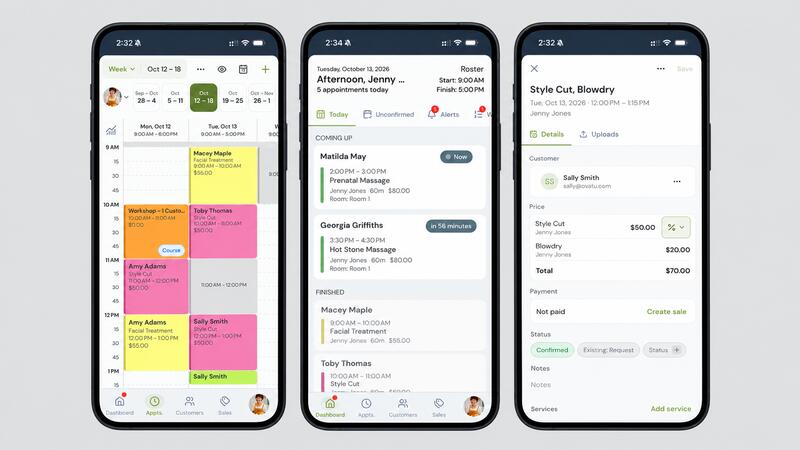
A little facelift for the Ovatu Mobile App.
A refresh of the Ovatu mobile app is now live on the App Store and Google Play. This update is all about polish: a refreshed look, smoother schedule navigation, the full set of customer and sales filters on mobile, and multitasking on iPad.
Here are the four changes you'll notice first.
1 - Refreshed Interface
What's new? We've given the whole app a tidy-up. The navigation, menus and buttons have a cleaner, more consistent design, and customer profiles, appointment panels and sale summaries are easier to read at a glance. Light and dark themes now look consistent across every screen.

Why? When you're moving between clients, every second counts. A clearer layout means less hunting and fewer taps to get the information you need.
Where? Everywhere. Just update the app and open it up.
2 - Smoother Schedule Navigation
What's new? Getting around your schedule is now quicker. Jump between weeks or days with the new date strip, switch views from the top menu, and swap employees in a tap. Appointments, classes and breaks are also clearer on the calendar, so you can see the shape of your day straight away.

Why? Your schedule is the screen you open most. Less scrolling and fewer taps means more time with clients and less time on your phone.
Where? Tap Appts. in the bottom menu.
3 - The Full Set of Filters, Now on Mobile
What's new? The customer and sales filters you use on the web app are now in the mobile app too. Filter customers by consent, subscriptions, birthdays, activity, uploads and custom fields. Filter sales by discounts, promo codes and payment type.

Why? Find the right clients wherever you are. Pull up everyone with a birthday this month, or check which sales used a promo code, without waiting until you're back at the desk.
Where? Tap Customers or Sales, then tap the filter icon in the top right.
4 - Multiple Windows on iPad
What's new? You can now open Ovatu in two windows side by side on iPad. Keep your schedule open in one window and sales or customers in the other, both on the same account.

Why? Check a client's history or ring up a sale without losing your place in the schedule.
Where? On iPad, open Ovatu, then use iPad multitasking to open a second Ovatu window next to it.
Get the Update The new version is live now. If your app doesn't update automatically, open the App Store or Google Play, search for Ovatu and tap Update.
Have a play and let us know what you think. Our support team is always happy to help. Download now: App Store · Google Play
We use cookies, including third party cookies, for operational purposes, statistical analyses, to personalize your experience, provide you with targeted content tailored to your interests and to analyze the performance of our advertising campaigns.